Photo: Donald Trung Quoc Don (Chữ Hán: 徵國單) - Wikimedia Commons - © CC BY-SA 4.0 International.(Want to use this image?)Origina / CC BY-SA 4.0 — via Wikimedia Commons
Overview
The Acer Chromebook 14 is an excellent choice for students seeking a reliable and portable laptop for their academic needs. With its lightweight design and long battery life, it allows students to easily carry it from class to class, ensuring they stay productive throughout the day.
Equipped with a vibrant 14-inch display and a comfortable keyboard, the Chromebook 14 enhances the learning experience with clear visuals and ease of use. Its seamless integration with Google services makes it ideal for collaboration and organization, catering perfectly to the needs of modern students.
In-depth review
Design & build
The Acer Chromebook 14 is a sleek and stylish laptop that boasts a premium aluminum chassis, giving it a robust and modern feel. Weighing just around 3.42 pounds, it strikes a balance between portability and sturdiness, making it easy for students to carry around campus. The 14-inch Full HD display offers vibrant colors and decent viewing angles, providing an enjoyable experience for both studying and streaming media. However, the screen's reflectivity can be an issue in bright environments, which may hinder visibility.
Performance for students
Powered by Intel's Celeron processors, the Acer Chromebook 14 is designed primarily for web-based tasks, which makes it suitable for students who primarily use applications like Google Docs, spreadsheets, and web browsing. The laptop comes with 4GB of RAM and options for 32GB or 64GB of eMMC storage, which is sufficient for light usage. However, power users or those needing to run multiple applications simultaneously may find the performance lacking. While it handles everyday tasks well, it can struggle with demanding applications or heavy multitasking.
Battery & everyday use
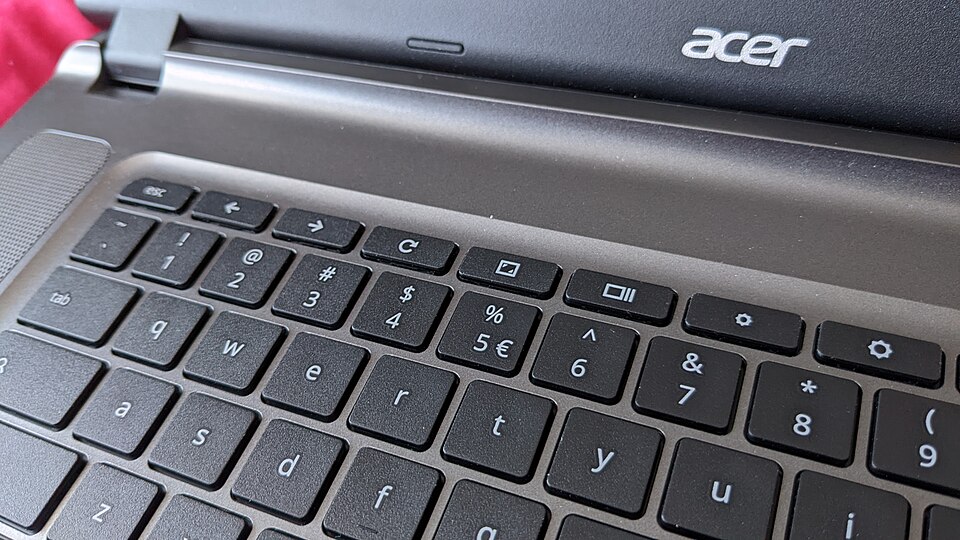
One of the standout features of the Acer Chromebook 14 is its impressive battery life. With up to 12 hours of use on a single charge, students can easily get through a full day of classes and study sessions without needing to recharge. This longevity is particularly beneficial for those who may not have access to power outlets during the day. In terms of everyday use, the Chromebook performs admirably for tasks such as browsing, document editing, and streaming. The trackpad and keyboard are comfortable to use, although some users may find the keys slightly shallow.
Value for money
The Acer Chromebook 14 is competitively priced within the Chromebook market, making it an attractive option for budget-conscious students. Given its solid build quality and excellent battery life, it offers good value for those who primarily require a device for online tasks. However, prospective buyers should weigh their needs against the limitations in performance and storage. If you are looking for a device that can handle more demanding software or extensive local storage, you may want to consider investing in a higher-end model.
Who should buy it
The Acer Chromebook 14 is a great fit for students who primarily need a reliable device for web-based applications, document editing, and media consumption. It is ideal for high school or college students who are focused on online learning, research, and light multitasking. However, it may not be suitable for those requiring advanced computing capabilities, such as graphic design students or gamers. For these users, a more powerful laptop would be a better investment. Overall, the Acer Chromebook 14 serves as an excellent, budget-friendly option for the right audience.
What buyers are saying
The Acer Chromebook 14 has garnered a mix of praise and criticism from buyers, reflecting common themes in user experiences. Here’s a summary of what customers appreciate and the issues they frequently encounter.
What buyers love
- Lightweight and portable design, ideal for students and professionals on the go.
- Long battery life, allowing for extended use without frequent recharging.
- Affordable price point, offering good value for the features provided.
- Simple and user-friendly interface, particularly for those familiar with Chrome OS.
Common complaints
- Limited storage capacity, which may require users to rely on cloud services.
- Performance issues with demanding applications, leading to occasional lag.
- Display quality, with some users finding it less vibrant compared to competitors.
This is an editorial summary of common themes in buyer feedback for this type of product — individual experiences vary. Check live ratings and verified reviews on the retailer before buying.
As an Amazon Associate and affiliate partner, ScholarshipsAds earns from qualifying purchases. Specs and rating are editorial; prices and availability may change.