Overview
The Acer Nitro 5 is an excellent choice for students who need a reliable laptop for both academic and gaming purposes. With its powerful hardware and customizable features, it offers a balanced experience for multitasking, whether you're writing essays or enjoying your favorite games during downtime.
This laptop combines performance with affordability, making it accessible for students on a budget. Its robust design ensures durability, while the backlit keyboard can be a great feature for late-night study sessions. Overall, the Acer Nitro 5 is a versatile option that meets the demands of student life.
In-depth review
Design & build
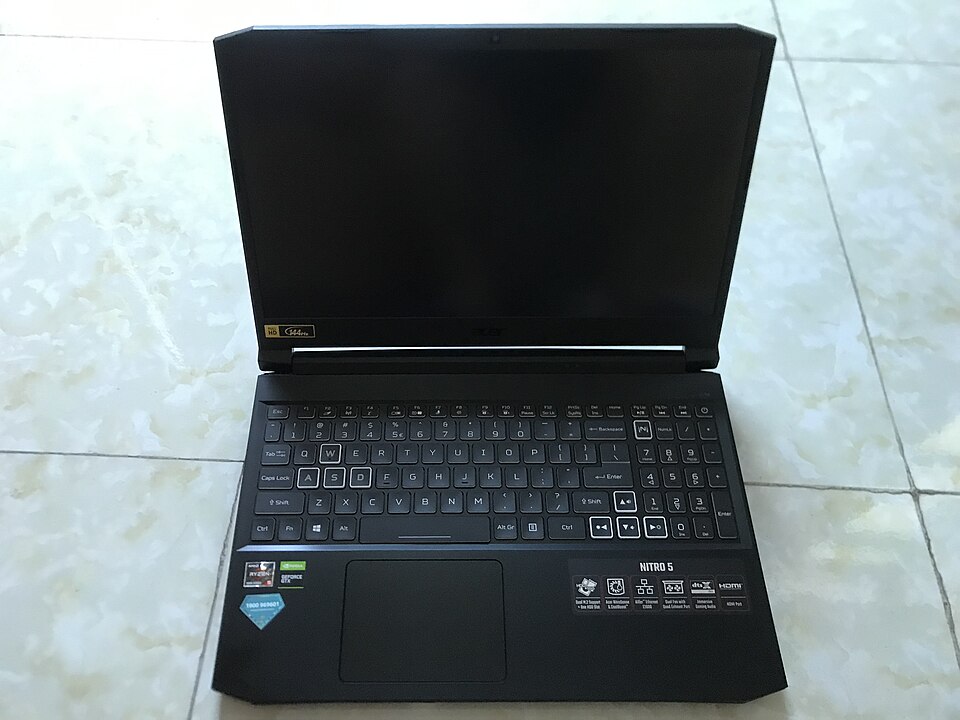
The Acer Nitro 5 showcases a bold design that appeals to students who appreciate a gaming aesthetic. Its matte black chassis with red accents adds a sporty touch, while the sturdy build quality gives it a sense of durability. Weighing around 5.07 pounds, it's not the lightest laptop on the market, but it’s portable enough for students who need to carry it to classes or study sessions.
One notable feature is the backlit keyboard, which is a plus for late-night study sessions. The keyboard has a comfortable layout with decent key travel, although the touchpad may feel a bit cramped for those who prefer extensive gestures. Overall, the Nitro 5 strikes a balance between style and functionality, making it a suitable choice for students who value aesthetics alongside performance.
Performance for students
Equipped with AMD Ryzen or Intel Core processors, the Acer Nitro 5 offers solid performance for multitasking and handling demanding applications. With options for 8GB to 16GB of RAM, students can run multiple tabs, software, and presentations without significant lag. The laptop also features NVIDIA GeForce GTX graphics, making it capable of handling light gaming and graphic-intensive tasks, which is a bonus for students studying design or gaming.
However, students may find its performance limited when running exceptionally heavy software, such as advanced video editing or 3D rendering programs. While it performs well for general use, those needing top-tier performance might have to look elsewhere or consider upgrading components.
Battery & everyday use
The battery life of the Acer Nitro 5 is one of its weaker points, averaging around 6 hours on a single charge during regular use. This may not be sufficient for students who spend long hours in classes or libraries without access to power outlets. The laptop does support fast charging, which can be beneficial for quick top-ups between classes.
In terms of everyday use, the Nitro 5 handles web browsing, word processing, and streaming without any hiccups. The display, while not the sharpest, offers decent color accuracy and brightness, making it suitable for watching videos or attending online lectures. However, the viewing angles may restrict the experience when sharing the screen with classmates.
Value for money
The Acer Nitro 5 is competitively priced, making it an attractive option for students on a budget. It offers a good balance of performance and features for the price point, especially for those looking for a laptop that can handle both academic tasks and gaming. However, it’s essential to weigh the performance against its limitations, such as battery life and weight, and consider how these factors align with personal needs.
Students should also be mindful that while the Nitro 5 is an affordable choice, investing a little more might yield better battery life and portability in other models, depending on their specific requirements.
Who should buy it
The Acer Nitro 5 is ideal for students who enjoy gaming and need a laptop that can handle a mix of academic and recreational tasks. It suits those pursuing degrees in fields like graphic design, gaming, or engineering due to its decent processing power and graphics capabilities. However, students who prioritize ultra-portability, long battery life, or high-end performance might want to explore other options.
In summary, the Nitro 5 stands out as a versatile laptop for students seeking a balance of performance and value, though it does come with some trade-offs that should be considered before making a purchase.
What buyers are saying
The Acer Nitro 5 has garnered a range of feedback from buyers, highlighting both its strengths and areas for improvement. Here’s a synthesis of the common themes seen in user reviews.
What buyers love
- Strong gaming performance with solid graphics capabilities.
- Good value for money, offering a balance between price and specifications.
- Comfortable keyboard and effective cooling system.
- Impressive battery life for a gaming laptop.
Common complaints
- Heavier and bulkier than some competitors.
- Audio quality could be improved.
- Upgrading components can be challenging due to design.
This is an editorial summary of common themes in buyer feedback for this type of product — individual experiences vary. Check live ratings and verified reviews on the retailer before buying.
As an Amazon Associate and affiliate partner, ScholarshipsAds earns from qualifying purchases. Specs and rating are editorial; prices and availability may change.