Overview
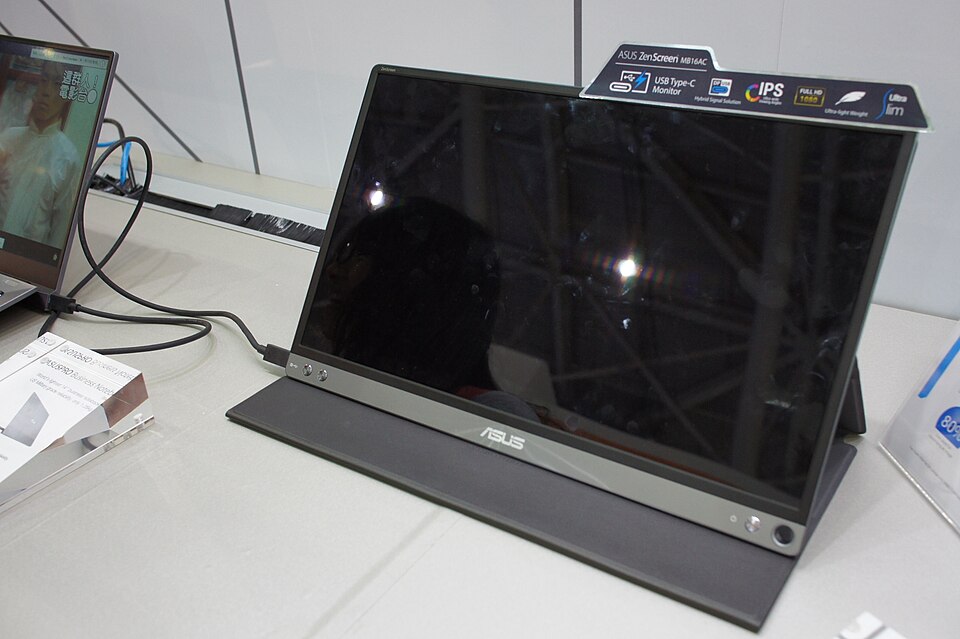
The ASUS ZenScreen MB16AC is an ideal portable monitor for students who need an extra screen for their studies. Weighing just 1.3 kg, it’s lightweight and easy to carry, making it perfect for those who are always on the go. With a 15.6-inch Full HD display, it provides sharp visuals and ample workspace for multitasking during lectures or while studying in a café.
Equipped with USB-C connectivity, this monitor can easily connect to a variety of devices, including laptops and smartphones. The ZenScreen's 180-degree flip design allows for versatile positioning, making it suitable for group study sessions or presentations. Its blue light filter also helps reduce eye strain, making it a great companion for long study hours.
In-depth review
Design & build
The ASUS ZenScreen MB16AC is a portable monitor that embodies a sleek and minimalist design, making it an attractive option for students on the go. Weighing just 0.78 kg (1.73 lbs) and featuring a slim profile of 8 mm, it easily fits into a backpack alongside a laptop. The 15.6-inch Full HD display is framed by thin bezels, which enhances the viewing experience and provides a modern aesthetic.
The monitor's build quality is commendable, with a durable plastic casing that can withstand everyday wear and tear. The included smart cover serves a dual purpose, acting as both a protective case and a stand. However, some users might find the stand to be less stable than desired, particularly in certain positions, which can be a drawback during presentations or collaborative work sessions.
Performance for students
When it comes to performance, the ASUS ZenScreen MB16AC delivers a vibrant Full HD resolution of 1920 x 1080, providing clear visuals for both productivity and entertainment. The IPS panel ensures wide viewing angles, making it ideal for group discussions or sharing content with classmates.
Students will appreciate the monitor's ability to connect seamlessly via USB-C, allowing for easy integration with modern laptops and smartphones. The inclusion of USB-A connectivity provides versatility, though students using older devices may need adapters. The screen's brightness level is adequate for indoor use, but it may struggle in brightly lit environments, which could be a limitation for those studying in cafes or outdoor spaces.
Battery & everyday use
The ZenScreen MB16AC boasts a built-in battery that offers up to four hours of use on a single charge, which is impressive for a portable monitor. However, heavy usage, especially at higher brightness levels, can drain the battery more quickly. For students who plan to use it for extended periods, having access to a power source becomes essential.
Everyday use is generally smooth, with quick response times that minimize lag during tasks like note-taking or browsing. The monitor also features a blue light filter to reduce eye strain, which is particularly beneficial for long study sessions. Nevertheless, the lack of advanced gaming features may deter gamers or those looking for high-refresh-rate displays.
Value for money
The ASUS ZenScreen MB16AC sits in a competitive price range for portable monitors. While it offers good build quality and performance, some students may find it slightly expensive compared to other options in the market. The investment is justified for those who prioritize portability and design, but students on a tight budget might want to explore more affordable alternatives that offer similar features without the premium price tag.
Who should buy it
This monitor is ideal for students who frequently travel or work in different environments, such as libraries, cafes, or study groups. Its lightweight design and easy connectivity make it a great companion for enhancing productivity on the go. However, it may not be the best option for those who require extensive gaming capabilities or need a monitor for high-performance tasks, as its specifications are better suited for general use.
In summary, the ASUS ZenScreen MB16AC is a solid choice for students seeking a portable monitor that combines style and functionality, but potential buyers should weigh its limitations against their specific needs.
What buyers are saying
The ASUS ZenScreen MB16AC has garnered a variety of feedback from buyers, highlighting both its strengths and areas for improvement. Below is a synthesis of common themes found in customer reviews.
What buyers love
- Portability and lightweight design, making it easy to travel with.
- High-quality display with vibrant colors and good resolution.
- Versatile connectivity options, including USB-C and HDMI.
- User-friendly features, such as the auto-rotation and built-in battery.
Common complaints
- Limited brightness levels, which can be inadequate in bright environments.
- Occasional issues with the auto-rotation feature not functioning as expected.
- Higher price point compared to some other portable monitors.
This is an editorial summary of common themes in buyer feedback for this type of product — individual experiences vary. Check live ratings and verified reviews on the retailer before buying.
As an Amazon Associate and affiliate partner, ScholarshipsAds earns from qualifying purchases. Specs and rating are editorial; prices and availability may change.