Overview
The HP Spectre x360 is an ideal choice for students seeking a versatile and powerful laptop. With its sleek design and flexible 2-in-1 functionality, it easily transitions from a laptop to a tablet, making it perfect for both note-taking in class and casual browsing during downtime.
Equipped with a long-lasting battery and a vibrant display, the Spectre x360 supports students through long study sessions and multimedia consumption. Its lightweight build ensures portability, allowing you to carry it effortlessly between classes or while traveling.
In-depth review
Design & build
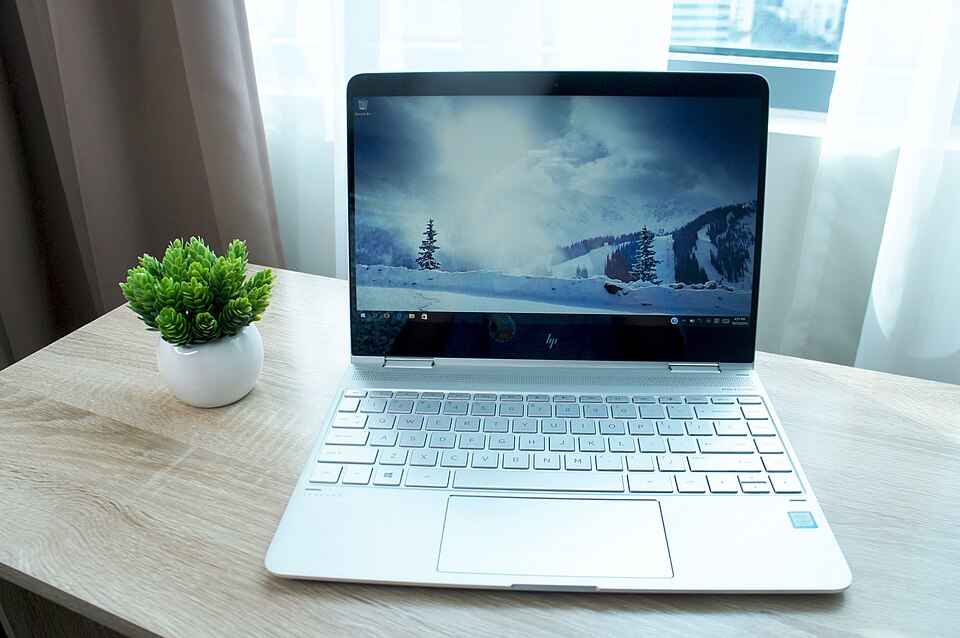
The HP Spectre x360 is a stunning example of modern laptop design, seamlessly blending aesthetics with functionality. Its sleek aluminum chassis is not only visually appealing but also durable, making it suitable for students who are frequently on the move. The 360-degree hinge allows for versatile use, enabling the device to transition between laptop and tablet modes effortlessly. The ultra-thin profile, measuring just around 0.67 inches, adds to its portability.
One of the standout features of the Spectre x360 is its edge-to-edge display, which offers vibrant colors and sharp visuals. Available in multiple screen sizes, including 13-inch and 15-inch options, the display provides ample real estate for multitasking while maintaining a lightweight feel. However, the glossy finish can lead to glare in brightly lit environments, which might be a drawback for some students.
Performance for students
Equipped with the latest Intel processors, the HP Spectre x360 delivers impressive performance for a wide range of student tasks, from writing essays to running demanding software for graphic design or engineering. The laptop can be configured with up to 16GB of RAM and 1TB of SSD storage, ensuring quick load times and efficient multitasking capabilities.
For students who engage in creative work, the Spectre x360's Intel Iris Xe graphics provide sufficient power for light to moderate gaming and graphic-intensive applications. However, it may struggle with high-end gaming or professional-level video editing, which could be a limitation for some users. Overall, the performance is robust enough for most students' needs, making it a reliable choice for academic use.
Battery & everyday use
Battery life is a crucial factor for students, and the HP Spectre x360 does not disappoint. Users can expect up to 12 hours of battery life on a single charge, depending on usage, which is ideal for long days spent in lectures or libraries. The laptop also features fast charging, allowing users to quickly recharge when time is of the essence.
In everyday use, the Spectre x360 impresses with its responsive keyboard and touchpad, enhancing the overall user experience. The backlit keyboard is particularly useful for studying in low-light environments. However, the laptop's fan can become somewhat noisy under heavy workloads, which may be distracting in quiet settings.
Value for money
While the HP Spectre x360 is undoubtedly a premium device, its price point may raise questions about value for money, especially for budget-conscious students. The combination of high-quality design, solid performance, and versatile functionality justifies the investment for many; however, students who only require basic computing tasks may find more affordable alternatives that meet their needs without breaking the bank.
Additionally, the laptop's longevity and performance may offset the higher initial cost, as it can serve students well throughout their academic journey. Nevertheless, it’s essential for prospective buyers to weigh their specific needs against their budget before committing to this purchase.
Who should buy it
The HP Spectre x360 is an excellent choice for students who prioritize design, portability, and performance. It is particularly well-suited for those in creative fields, such as graphic design, multimedia arts, or architecture, who can benefit from its powerful hardware and versatile usability. Additionally, students who frequently multitask will appreciate the laptop's speed and efficiency.
However, those who primarily need a laptop for basic tasks like browsing the web, word processing, or attending online classes may find more cost-effective options available. Ultimately, the Spectre x360 is best for students willing to invest in a premium device that combines style and functionality for a comprehensive academic experience.
What buyers are saying
The HP Spectre x360 consistently receives feedback from buyers reflecting both their admiration and concerns regarding the product. Here are some common themes found in their reviews.
What buyers love
- Elegant design and premium build quality
- High-resolution display with vibrant colors
- Versatile 2-in-1 functionality for both laptop and tablet use
- Impressive battery life, allowing for extended usage
Common complaints
- High price point compared to competitors
- Occasional performance issues under heavy multitasking
- Limited port selection, which may require adapters
This is an editorial summary of common themes in buyer feedback for this type of product — individual experiences vary. Check live ratings and verified reviews on the retailer before buying.
As an Amazon Associate and affiliate partner, ScholarshipsAds earns from qualifying purchases. Specs and rating are editorial; prices and availability may change.