Overview
The Microsoft Surface Go 2 is an ideal companion for students seeking a blend of portability and performance. With its lightweight design, this device ensures that you can easily carry your coursework and projects to class or the library. The high-resolution touchscreen provides an engaging experience for note-taking and media consumption.
Equipped with a capable processor and ample battery life, the Surface Go 2 is perfect for real-world applications like web browsing, document editing, and video conferencing. The build quality is impressive, offering a premium feel at a competitive price point, making it an excellent value for students navigating their academic journey.
In-depth review
Design & build
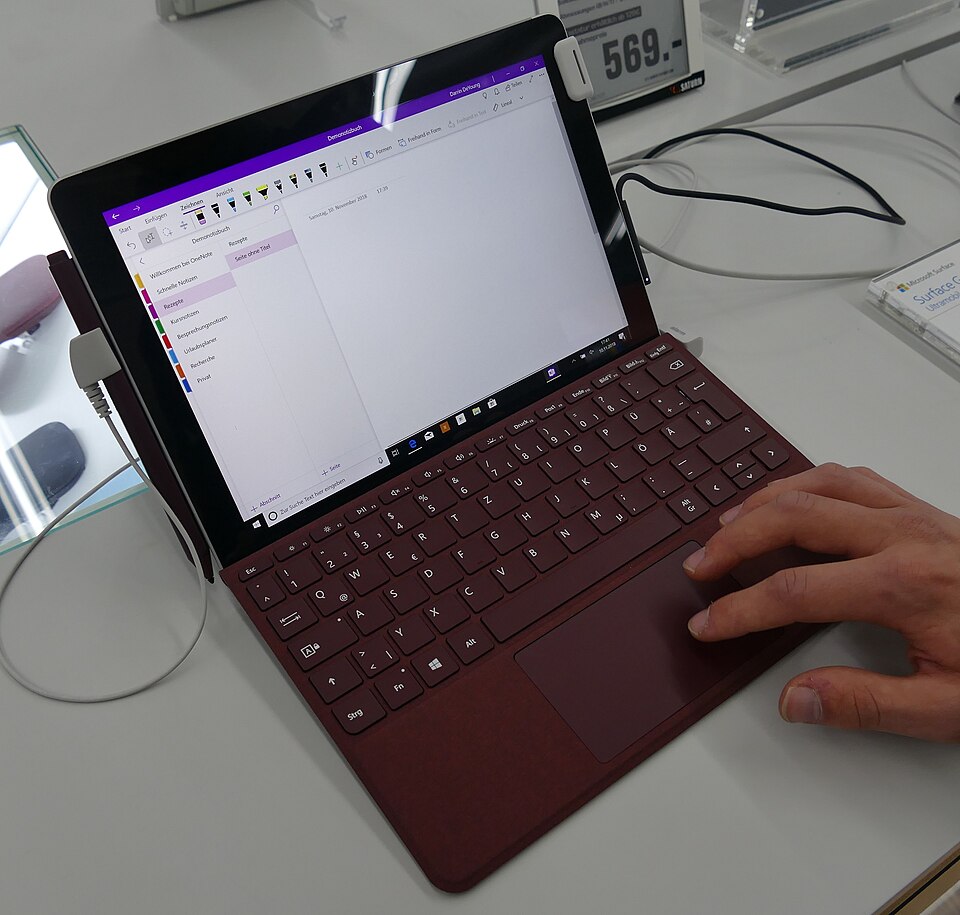
The Microsoft Surface Go 2 presents a sleek and modern design that is both portable and stylish, making it an appealing choice for students. Weighing in at just under 1.2 pounds and featuring a 10.5-inch touchscreen display, it’s lightweight enough to carry around campus without any hassle. The aluminum casing gives it a durable feel, while the adjustable kickstand allows for versatile usage in various settings, whether in a lecture hall or a coffee shop.
However, the compact size does come with some trade-offs. The smaller screen may not be suitable for everyone, particularly for tasks that require extensive multitasking or detailed work. Additionally, the bezels are relatively thick compared to newer devices, which can detract from the overall aesthetic.
Performance for students
Under the hood, the Surface Go 2 is powered by Intel’s Pentium Gold or Core m3 processors, depending on the configuration chosen. For basic tasks such as web browsing, document editing, and streaming, it performs adequately. Students can expect a smooth experience when using applications like Microsoft Office or Google Docs.
However, users should be cautious about its limitations. The device can struggle with more demanding applications, such as graphic design software or extensive video editing tools. With a maximum of 8GB of RAM, multitasking can become cumbersome, especially if several applications are open simultaneously. For students heavily reliant on intensive software, this may not be the ideal machine.
Battery & everyday use
The Surface Go 2 boasts an impressive battery life, lasting up to 10 hours on a single charge under typical usage conditions. This is particularly beneficial for students who often find themselves in classes or studying in libraries without immediate access to power outlets. The device also features fast charging capabilities, allowing you to quickly top up the battery when needed.
In terms of everyday use, the Surface Go 2 excels in its versatility. The touchscreen is responsive, and the optional Surface Pen enhances the experience for note-taking or drawing. However, the lack of a full-sized USB port might be a limitation for some users, necessitating the use of adapters for connecting peripherals.
Value for money
When it comes to value, the Surface Go 2 sits in a competitive price range for a 2-in-1 device. While it offers quality build and decent performance for casual users, it may seem overpriced compared to other budget laptops that offer more robust specifications. The need for additional purchases, such as the keyboard cover and Surface Pen, can also drive up the overall cost.
For students on a tight budget, it’s essential to weigh the costs against the features. If you’re primarily focused on basic tasks, the Surface Go 2 offers value through its portability and battery life. However, those needing more power may find better alternatives in this price bracket.
Who should buy it
The Microsoft Surface Go 2 is an excellent choice for students who prioritize portability and battery life over raw performance. It is ideal for those engaged in light tasks such as note-taking, web browsing, and content consumption. Additionally, its versatility as a tablet and laptop hybrid makes it attractive for creative students interested in drawing or sketching.
However, heavy users or those requiring more processing power for tasks like programming, video editing, or graphic design should consider investing in a more powerful laptop. Overall, the Surface Go 2 serves as a solid option for students who need a reliable and portable device for everyday academic tasks.
What buyers are saying
The Microsoft Surface Go 2 has garnered a variety of feedback from buyers, highlighting both its strengths and areas for improvement. Here’s a synthesis of the common themes found in customer reviews.
What buyers love
- Compact and lightweight design, making it easy to carry and use on the go.
- Versatile functionality, serving as both a tablet and a laptop with its detachable keyboard.
- High-quality display with vibrant colors, enhancing the visual experience for users.
- Strong battery life, allowing for extended use without frequent recharging.
Common complaints
- Limited processing power for demanding applications, leading to performance issues.
- Higher price point compared to other similar devices, which may not justify the features for some buyers.
- Accessories, such as the keyboard and stylus, often sold separately, increasing the overall cost.
This is an editorial summary of common themes in buyer feedback for this type of product — individual experiences vary. Check live ratings and verified reviews on the retailer before buying.
As an Amazon Associate and affiliate partner, ScholarshipsAds earns from qualifying purchases. Specs and rating are editorial; prices and availability may change.